Configuring Check Options

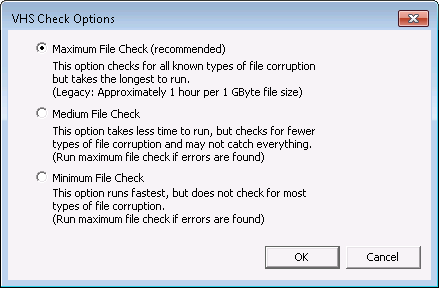
VHS Check has three Check Options: Minimum File Check, Medium File Check, and Maximum File Check.

VHS Check Options

VHS Check Options

VHS Check Options for ESE-Based Datastore Files

VHS Check Option Actions

Minimum File Check

  • Checks the VHS Check utility version against the VHS schema version.
  • Checks VHS datastore provided by the user against the current ESE-based VHS schema.
  • Checks if previous shutdown was bad.

Medium File Check

  • Checks all steps in previous check.
  • Checks statistics (value count, earliest/latest date).

Maximum File Check

  • Checks all steps in previous check.
  • Checks orphaned values (potential data loss).

VHS Check Options for Legacy Data Files

VHS Check Option Actions

Minimum File Check

The Minimum File Check is a cursory check. It cleans up the bad shutdown and checks data file statistics. For legacy data files, the Minimum File Check takes approximately five minutes per gigabyte of data.

Names File Check

  • Checks names file statistics and file size for validity.
  • Checks all names file entries to make sure statistics such as tag, oldest/newest time, and index and value file offsets are valid.

Index File Check

  • Checks the index file free list to verify valid free list pointers.
  • Traverses the index file free list blocks to verify previous block pointers, verify that blocks in free list have no index entries, and verify that the number of blocks found equals the block count statistic.

Values File Check

  • Checks the values file free list to verify valid free list pointers.
  • Traverses the values file free list blocks to verify previous block pointers, verify that blocks in free list have no value entries, and verify that the number of blocks found equals the block count statistic.
  • Verifies valid size of value block list.
  • For each tag, verify validity of head/tail value blocks pointers.

Medium File Check

Names File Check

  • Checks all steps in previous check.

Index File Check

  • Checks all steps in previous check.
  • Verifies valid size of index block list.
  • For each tag, traverses time index block list to verify previous block pointers, time index block count, oldest time statistic, and that all entries are ordered correctly by time. A time index block list error can cause a index file rebuild if fixes are turned on.

Values File Check

  • Checks all steps in previous check.

Maximum File Check

Names File Check

  • Checks all steps in previous check.

Index File Check

  • Checks all steps in previous check.

Values File Check

  • Checks all steps in previous check.
  • For each tag, traverses the value block list and looks for cycles in the list, checks value block counts and oldest/newest times for validity, verifies that each value entry has a valid timestamp and value entries are ordered correctly by time.
  • Block counts, value counts, oldest time, and newest time are calculated and compared against name statistics.
  • If a value block fails one of these criteria, the index file will be rebuilt.
  • If a cycle is found and fixes are turned on then the list is truncated and clipped.
  • Orphan blocks are returned to free list.
  • If an index file rebuild is not scheduled, the index file will be checked against its value blocks. Time index entries are checked to make sure they have corresponding value block entries in the values file and that the oldest time in the index entry matches the actual oldest time of the value block. If this check comes up clean, then it is verified that the order that time index entries appear is the same order that associated value blocks appear.

Back to top